In today’s fast-paced digital landscape, automation tools have become essential for businesses looking to streamline operations and enhance productivity. One such tool gaining popularity is n8n, an open-source workflow automation platform that allows users to connect various services and automate tasks through a user-friendly visual interface. This article will explore what n8n is, its key features, and why it should be on your radar.
What Is n8n?
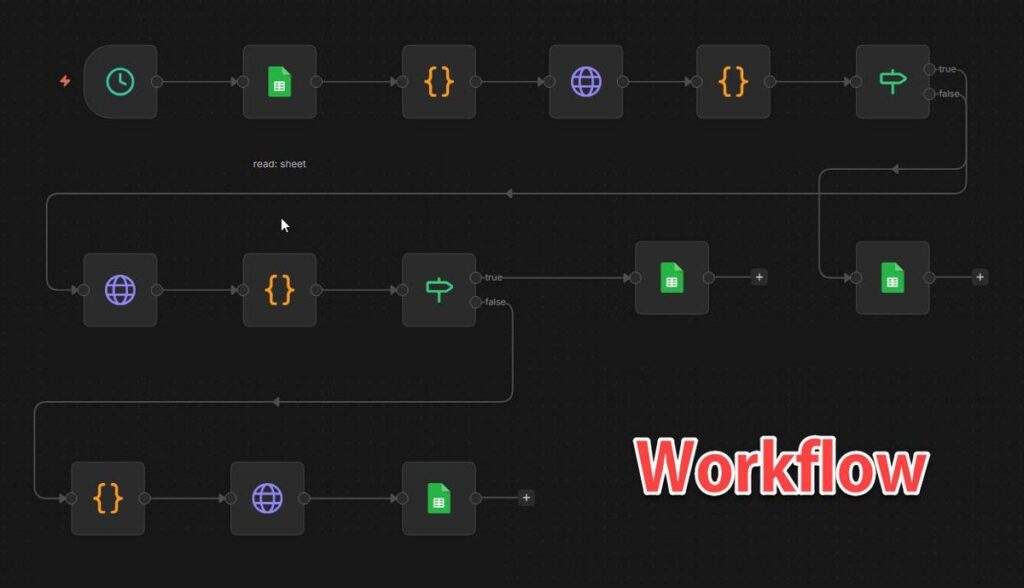
n8n is a powerful automation tool designed to help users create workflows that link different services, APIs, and databases. Unlike traditional automation platforms that are often limited in functionality and integrations, n8n offers a flexible environment where users can build complex workflows using a visual editor. With n8n, you can automate repetitive tasks, synchronize data across platforms, and enhance your overall productivity.
Why Should You Use n8n?
There are several compelling reasons to consider using n8n for your automation needs:
- Self-Hosting Capability: n8n can be self-hosted, giving you complete control over your data and workflows. This is particularly important for businesses that prioritize data privacy and security.
- Diverse Integrations: With over 300 integrations available, n8n can connect to various services, enabling seamless data flow between applications.
- Visual Workflow Editor: The intuitive drag-and-drop interface allows users to create workflows without needing extensive coding knowledge, making it accessible for both technical and non-technical users.
- Event-Driven Execution: n8n supports event-driven execution, meaning workflows can be triggered by specific events, allowing for real-time automation.
- Extensible Design: n8n’s architecture is modular, allowing developers to create custom nodes and functionalities tailored to their specific needs.
Key Features of n8n
n8n boasts a variety of features that set it apart from other automation tools:
- Visual Workflow Editor: Users can design workflows visually, simplifying the automation process.
- 300+ Integrations: n8n supports a wide range of applications, making it versatile for different business needs.
- Self-Hosting Support: Users can host n8n on their own servers, ensuring data security and compliance.
- Native JavaScript Functionality: For more advanced users, n8n allows the incorporation of JavaScript code into workflows, enabling complex logic and calculations.
- Robust Security Features: n8n offers various security measures, including access controls and encryption, to protect sensitive data.
Practical Use Cases for n8n
n8n is not just a theoretical tool; it has practical applications across various industries. Here are a few examples:
- Data Synchronization: Businesses can use n8n to synchronize customer data between CRM systems and marketing platforms, ensuring consistency across all channels.
- Task Automation: n8n can automate repetitive tasks, such as sending emails or generating reports, freeing up valuable time for employees.
- DevOps Automation: Development teams can automate deployment processes, monitor server health, and manage infrastructure more efficiently.
- Internal Tool Development: Companies can quickly build internal tools to streamline processes, such as tracking project progress or managing inventory.
Conclusion
n8n is a versatile and powerful automation tool that can significantly enhance productivity and efficiency in various business processes. With its extensive integrations, visual workflow editor, and robust security features, n8n is a worthy addition to any organization looking to streamline its operations. Whether you are a small business or a large enterprise, n8n can help you automate workflows and optimize your processes effectively.
Read more
- Understanding TrueNAS RAID Levels: Stripe, Mirror, RAIDZ, and dRAID Explained
- Samba – Part 1 – Install Samba Server on Linux Ubuntu | Debian
- How to Install Android on Hyper-V using BlissOS on Windows
- Top Free NAS OS to Build Your Own NAS Server
- TrueNAS Core vs TrueNAS Scale – Which NAS OS Is Right for You?