Understanding VDEV Layouts in TrueNAS (ZFS)
When setting up a storage system on TrueNAS (powered by the ZFS File System),
the most critical step is choosing the right VDEV (Virtual Device) Layout.
This decision directly impacts your usable capacity, read/write performance,
and, most importantly, your data redundancy.
In this guide, we will decode the layout options in TrueNAS so you can choose the right configuration
before hitting the “Create Pool” button.
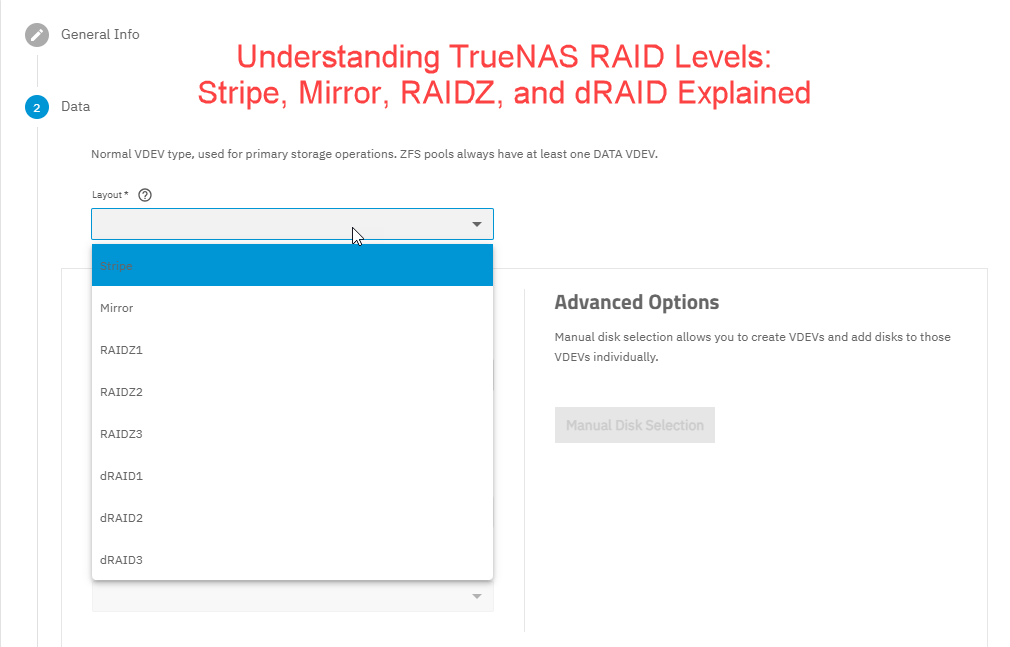
Stripe (No Redundancy)
A Stripe layout is equivalent to RAID 0.
Data is spread across all disks in the VDEV.
Pros:
- Fastest read/write performance as it leverages the bandwidth of all drives.
- 100% of the total disk capacity is usable.
Cons:
- Extremely Risky. If a single drive fails, the entire Pool is lost (Total Data Loss).
Best For:
- Temporary data
- Scratch space (Cache)
- Non-critical data that is already backed up elsewhere
Mirror (The Safe & Fast Choice)
A Mirror layout is equivalent to RAID 1.
Data is duplicated identically across two or more disks.
Pros:
- High data security.
- Excellent read speeds (data can be read from multiple drives simultaneously).
- Fastest resilver (recovery) time since data is simply copied from the surviving drive.
Cons:
- Lowest storage efficiency. For example, if you have two 10TB drives, you only get 10TB of usable space.
Best For:
- Operating systems
- Database storage
- Virtual Machines (VMs) that require high IOPS and low latency
RAIDZ Levels (The “Golden Standard” for Storage)
RAIDZ is ZFS’s unique way of balancing capacity and protection using
Parity (error-checking data).
RAIDZ1 (Similar to RAID 5)
- Fault Tolerance: Can survive the failure of one drive.
- Minimum Drives: 3 disks.
- Note: Not recommended for high-capacity drives (over 8TB) because the risk of a second drive failing during the long recovery process is significantly high.
RAIDZ2 (Similar to RAID 6) – The Recommended Choice
- Fault Tolerance: Can survive the failure of two drives simultaneously.
- Minimum Drives: 4 disks.
- Why choose it: This is the “sweet spot” for home NAS users and small businesses. It provides enough safety to allow you time to replace a failed drive without losing data.
RAIDZ3
- Fault Tolerance: Can survive the failure of three drives.
- Minimum Drives: 5 disks.
- Best For: Massive storage arrays with a very high number of disks (e.g., 12–15 drives per VDEV).
dRAID (Distributed RAID) – For Enterprise Systems
dRAID is an advanced layout designed for massive scale-out storage.
Unlike traditional RAIDZ, dRAID distributes parity and “hot spare” space
across all disks in the pool. When a drive fails, every remaining drive participates in the recovery,
reducing resilver times from days to hours.
Best For:
- Systems with 20+ drives
Quick Comparison Table
| Layout | Max Drive Failures | Usable Capacity | Priority |
| Stripe | 0 | 100% (Total) | Maximum Speed |
| Mirror | n-1 | Capacity of 1 Drive | Safety & IOPS |
| RAIDZ1 | 1 | Total – 1 Drive | Cost Efficiency |
| RAIDZ2 | 2 | Total – 2 Drive | Data Protection |
| RAIDZ3 | 3 | Total – 3 Drive | Massive Storage |
Expert Advice
If you prioritize data safety, RAIDZ2 is your best bet. For virtualization or high-performance apps, stick with Mirrors. And remember: RAID is not a backup! Always maintain an external copy of your critical data.
Have questions about your specific hardware? Leave a comment below!