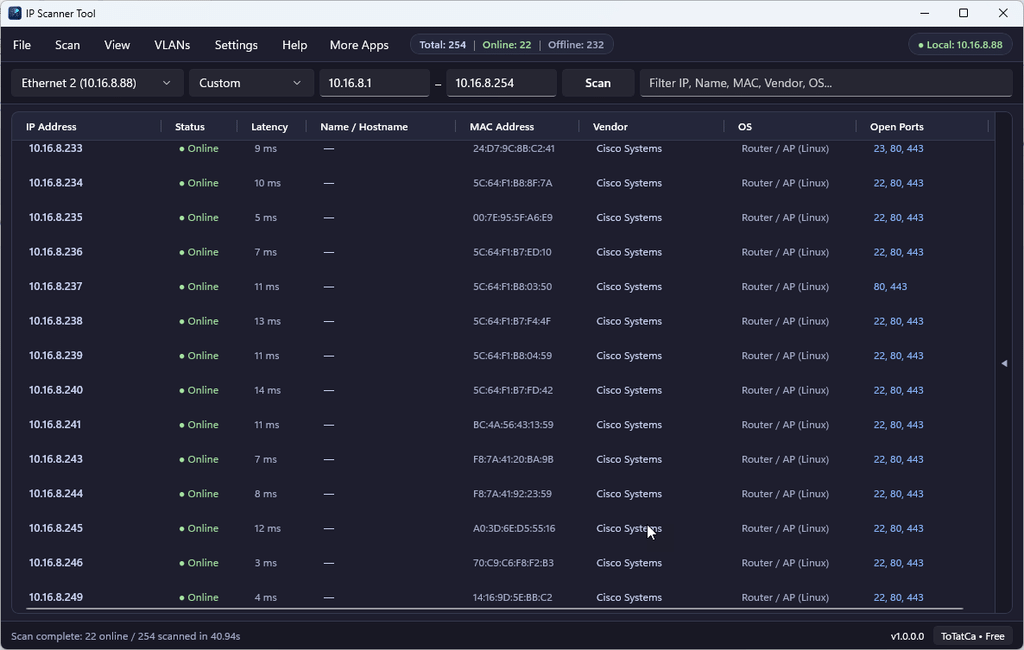
Whether you are an IT administrator tracking down a network printer, a technician configuring IP cameras and access points, or a home-lab enthusiast checking who is connected to your Wi-Fi, you need a fast and reliable network scanner. Built natively with WinUI 3 and .NET 10, IP Scanner Tool by ToTatCa delivers a clean, high-speed Windows 11 experience—with 100% of features completely free.
Key Features of IP Scanner Tool
1. Multi-Protocol Discovery with Proxy ARP Protection
Many modern devices—such as smartphones, IoT gadgets, and Windows PCs with strict firewall rules—block ICMP Ping requests. IP Scanner Tool combines high-speed multi-threaded ICMP Ping, interface-bound SendARP (with automatic filtering of Proxy ARP ghost MACs), and TCP port probing so you get accurate online results without false positives.
2. 52,000+ Offline IEEE OUI Vendor Lookups
Identify hardware manufacturers instantly without needing an Internet connection. IP Scanner Tool embeds over 52,000 IEEE OUI prefixes (supporting 24-bit, 28-bit, and 36-bit ranges) to recognize routers, switches, IP cameras, NAS boxes, PCs, and mobile devices from Cisco, Cambium, TP-Link, MikroTik, Ubiquiti, Hikvision, Synology, Apple, Intel, Dell, and more.
3. Multi-Layer Hostname Resolution & OS/TTL Fingerprinting
- Hostname Discovery: Resolves device names across NetBIOS (UDP 137), mDNS/Bonjour (UDP 5353), Reverse DNS, SSDP/UPnP, and HTTP page titles.
- OS & Platform Hints: Combines ICMP TTL, open TCP ports, and vendor signatures to estimate whether a host is Windows, Router / AP (Linux), IP Camera, Network Printer, NAS, macOS / iOS, or Linux / Android.
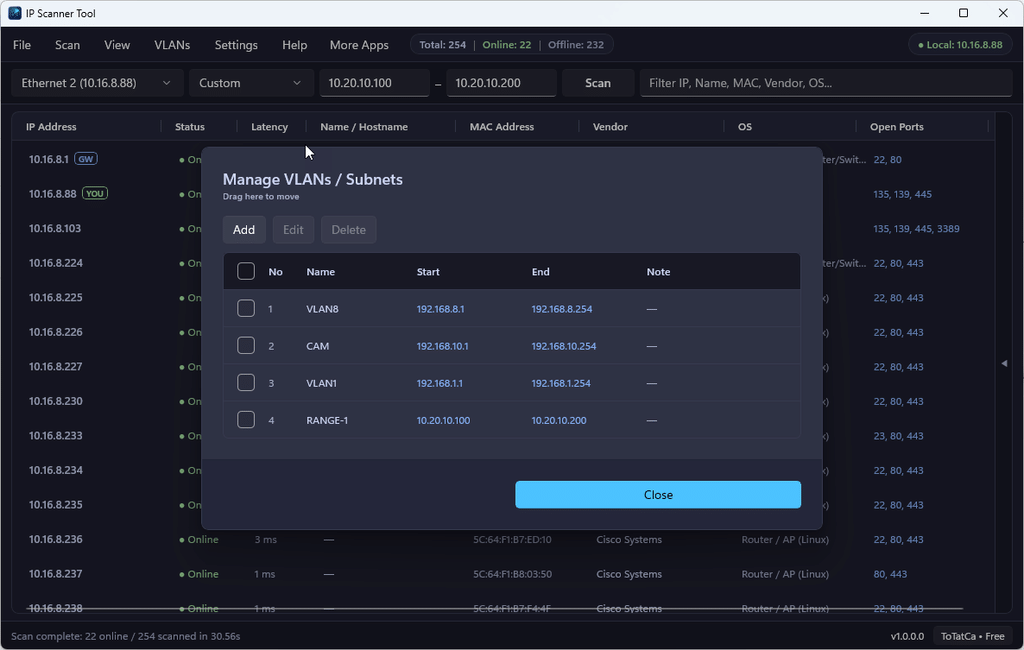
4. Custom VLAN Manager & SQLite-Backed Scan Ports Table
- VLAN / Subnet Manager: Automatically detects your active adapter’s subnet (
Auto), lets you declare and label custom VLANs (Name,Start,End,Note) in local SQLite for one-click switching, or enter any customStart IP – End IPrange (Custom). - Customizable Scan Ports: Comes preloaded with 16 essential TCP ports (HTTP, HTTPS, SSH, Telnet, SMB, RDP, RTSP, and printer ports
631/9100). Toggle ports on or off with a checkbox, or add, edit, and delete ports anytime.
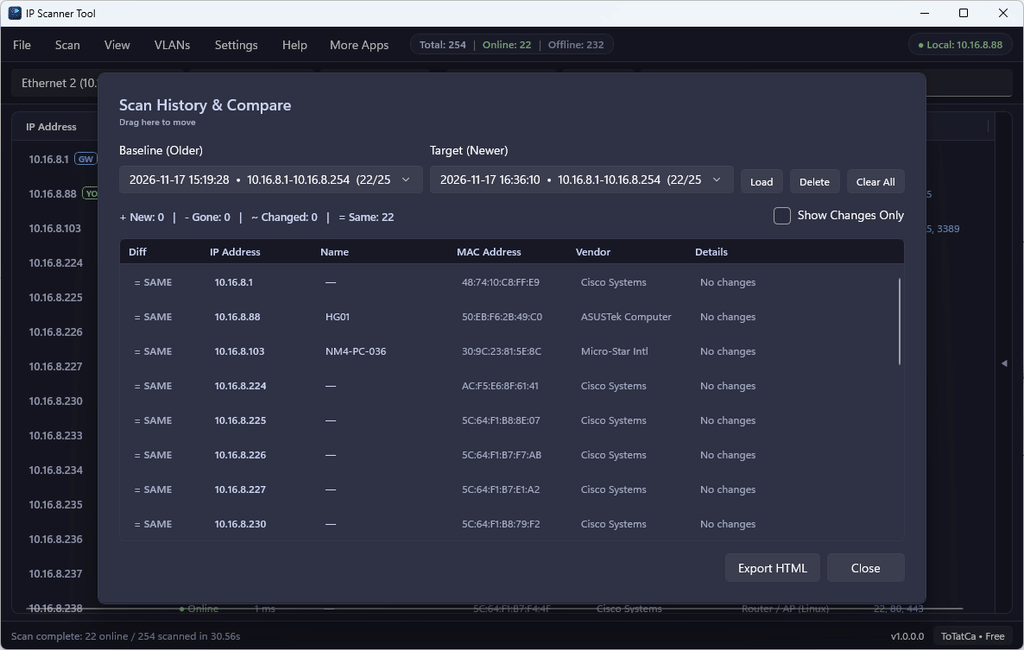
5. Automatic Scan History & Network Comparison (HTML Report Export)
Every scan snapshot is automatically saved to a local SQLite database (up to 100 recent scans). Open Scan → Scan History & Compare to compare any two points in time and instantly spot:
+ NEW: Newly joined or unknown devices.- GONE: Devices that went offline or disconnected.~ CHG: Devices whose IP address, hostname, or open ports changed. You can load any historical snapshot back into the main table or click Export HTML to generate a clean, shareable comparison report.
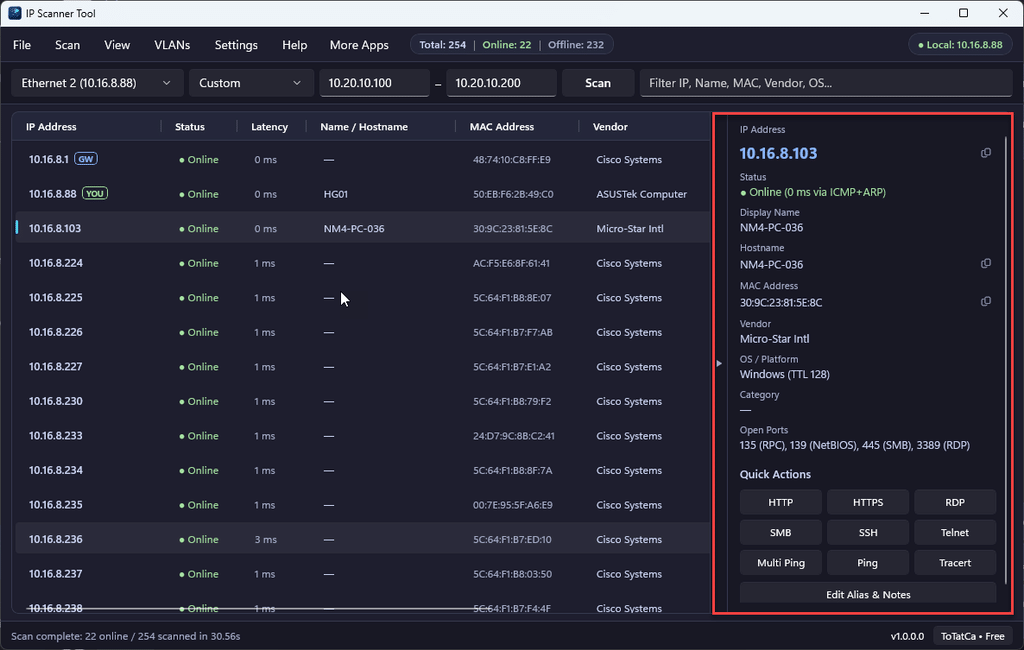
6. Collapsible Device Inspector & Technician Quick Actions
Click any discovered host to open the collapsible Device Inspector on the right (toggleable anytime via the edge arrow button). Copy the IP Address, Hostname, or MAC Address in one click, save custom device aliases and notes, or launch Quick Actions directly:
- HTTP / HTTPS web admin pages
- RDP (Remote Desktop), SMB (
\\IP), SSH, and Telnet - Continuous Ping (
ping -t) and Tracert - Direct integration with Multi Ping Tool (from ToTatCa) for continuous 24/7 uptime monitoring.
Private, Local-First, and 100% Free
- No subscriptions, no paywalls, no ads: Every feature—including CSV, JSON, and HTML exports, VLAN profiles, custom ports, and scan comparison—is 100% unlocked for free.
- Strict Local Privacy: All scans run directly on your local network. Settings, VLANs, aliases, and scan history are stored solely on your PC in
%LocalAppData%using SQLite—no scan data is ever sent to external servers. - Customizable UI: Includes Dark Mode (default), Light Mode, and System Default themes, plus resizable table columns and live search filtering.
Download IP Scanner Tool
Install IP Scanner Tool safely with automatic updates directly from the Microsoft Store:

- Microsoft Store: Download IP Scanner Tool on Microsoft Store
- Privacy Policy: ToTatCa Privacy Policy